# Шалгах буюу баталгаажуулах

Баримт бичгийг блокчэйн дээр бичигдсэн эсэхийг шалгахдаа дараах 3 аргыг ашиглаж болно.

<table><thead><tr><th width="314">Сервис</th><th>Нөхцөл</th></tr></thead><tbody><tr><td><a href="/pages/VATNaKbAtW4nl7VVW4xr">Notly.mn веб</a></td><td>Та болон танай байгууллага баримт бичгийг шууд хараад өөрийн нүдээр шалгаж буй бол</td></tr><tr><td><a href="/pages/lAbUQyjPqclhByE0mNaB">REST Api</a> </td><td>Байгууллагын ERP системээс автоматаар шалгахыг хүсэж байгаа ба Node.js-ээс өөр фрэймворк ашиглаж буй бол.</td></tr><tr><td><a href="/pages/Ac0J3wigy6u4sjShVBAg">Бидний хөгжүүлсэн санг (library)</a></td><td>Автоматаар шалгахыг хүсэж байгаа эсвэл <a href="https://notly.mn">Notly.mn веб</a>-тэй ижил сайт өөрсдийн домайн дээр байршуулахыг хүсэж байгаа бол. </td></tr></tbody></table>

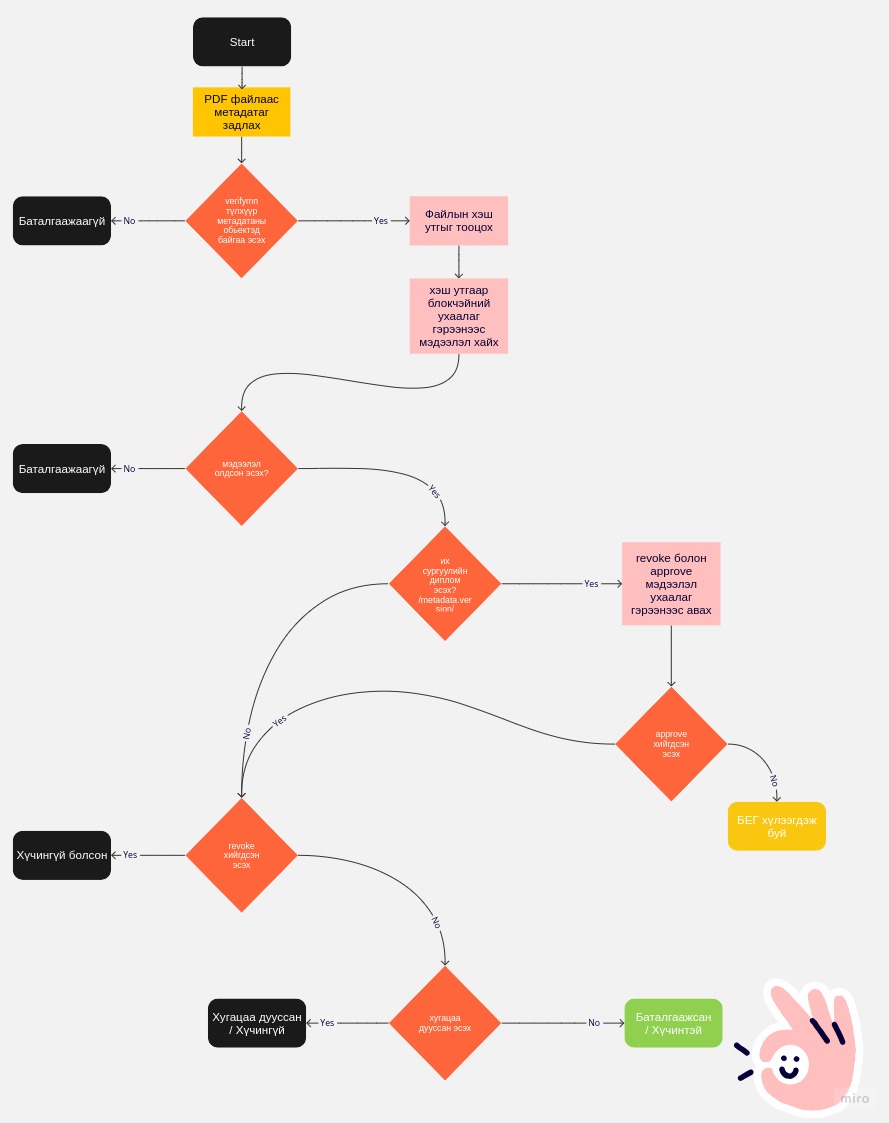
#### Шалгах үеийн процессийг доорх зурагт үзүүлэв

<figure><img src="/files/jlnvTXunX5aeIRRV5hoO" alt=""><figcaption><p>Шалгах үеийн процесс диаграм</p></figcaption></figure>


---

# Agent Instructions: Querying This Documentation

If you need additional information that is not directly available in this page, you can query the documentation dynamically by asking a question.

Perform an HTTP GET request on the current page URL with the `ask` query parameter:

```
GET https://docs.certify.mn/notly/verify-document.md?ask=<question>
```

The question should be specific, self-contained, and written in natural language.
The response will contain a direct answer to the question and relevant excerpts and sources from the documentation.

Use this mechanism when the answer is not explicitly present in the current page, you need clarification or additional context, or you want to retrieve related documentation sections.
